Showing posts with label electrical tape. Show all posts

Saturday, January 2, 2016

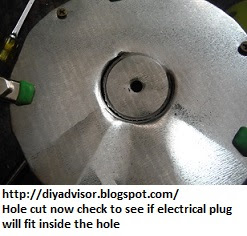
How to Create and Install Xenon Pucks into a Bedroom Light Tier - Part 6 of 8 - Cutting the Xenon Plug Hole

Fig.1 Commercial 
Electric® 
Xenon Lamp Kit
By Gary Boutin 

Supplies and Tools:
#8 Wood screws 
18-Volt Ryobi Cordless Phillip Screwdriver
Claw hammer (small)
Commercial Electric® 3 Light Xenon Task Kit
Electrical tape (black)
Galvanized flat sheet metal (36 in by 48 in)
Jewelers Precision Screwdriver Set
Marking pen (any color)
Metal files
Metal Hole saw kit
Needlenose pliers
Spring clips small (green)

In 1991 we received a bed set with a light tier over the bed. It had side drawers tiers tall enough to hold over the mirror a bridge that housed 3-incandescent lights that could be dimmable from a switch within the headboard. Theses posts shows my solution. 

This post shows eight steps to installing the Commercial Electric® puck lights

Step 1:
Fig.1 and fig.2 shows the Commercial Electric® 3 Light Xenon Task and Accent Light Kit.
Fig.2 Open the Kit

Step 2: Fig.3 shows the puck Commercial Electric® Xenon® light that will be installed on the old lamp.
Fig.3 Xenon light

Step 3: Fig.4 and fig.5 shows that using a permanent marker will mark the area to be cut.
Fig.4 Marker

Fig.5 Place in the middle

Step 4: Fig.6 shows the outer edges of the Commercial Electric® Xenon® lamp makes a perfect template to cut.
Fig.6 The Template

Step 5: Fig.7 shows to place the Commercial Electric® Xenon plug into the size of the hole saw to make sure it fit correctly. Fig.8 shows the needlepoint vice grip® pliers and Ryobi cordless drill with a hole saw to cut into the base of the lamp. Fig.9 shows that using a claw hammer to knock down the sheet metal that was cut from the hole saw.
Fig.7 Puck plug

Fig.8 Cutting the lamp

Fig.9 Claw hammer

Step 6: Fig.10 and fig.11 shows the hardware screws organizer.
Fig.10 Hardware
Fig.11 Wood screws

Step 7: Fig.12 shows that using the same hole saw to cut through the sheet metal. Fig.13 and fig.14 shows the sheet metal is cut and there is enough metal to push through the metal base.
Fig.12 Sheet metal

Fig.13
Fig.14 Push hole through
Step 8: Fig.15 and fig.16 shows the electrical wiring plug fits through hole.
Fig.15

Fig.16 Lamp sealed
with electrical tape


How to Create and Install Xenon Pucks into a Bedroom Light Tier


Update: DIY Advisor has New blogs check them today:

  • Cookie Alert: European Union laws requires that you know that this blog uses cookies. If you are concerned about this please click here to see how Google uses this information.

Note: The DIY Advisor assumes no liability for omissions, errors or the outcome of any jobs. The reader must always exercise reasonable caution, follow current codes and regulations that may apply, and is urged to consult with a licensed contractor if in doubt about any steps on these posts. All names were changed to protect client's privacy. DIY Advisor. Reproduction of site content including photos without permission prohibited. All rights reserved. © Copyright 2011-

Wednesday, October 21, 2015

How to Rewire a Lamp Part 1 of 2 - Taking Apart the Lamp

Fig.1 Westinghouse 
Make-A-Lamp Kit
By Gary Boutin

Tools and supplies 
Flat head screwdriver
Lamp kit
Pliers
Electrical tape

I inherited this lamp from my mother. The lamp is about 15 years old and it doesn't match anything in the bedroom. But it's special to me and worth saving.

This post shows the eleven steps on how to take apart a lamp.

Step 1: This Westinghouse Make-A-Lamp Kit that contains everything needed to rewire a lamp. This lamp kit was purchased from The Home Depot. Fig.2 shows the lamp kit repair logo.
Fig.2
Westinghouse 
Make-A-Lamp Kit
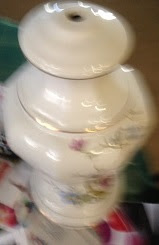
Step 2: Fig.3 show the lamp interior, the bulb base rotated and the electrical cord was twisted inside the lamp. Remove the finial (white porcelain screw) to release the lamp shade. Fig.4 shows a lamp harp that holds up the white shade and white porcelain finial ball. Squeeze both sides of the lamp harp and pull up the harp sleeves to remove it from the lamp body. Harp Sleeves are located at the bottom of the harp.
Fig.3 Finial porcelain ball
Fig.4 Harp
Step 3: Fig.5 shows this old damaged brass lamp socket comes with a decorative key to turn the lamp on or off. The decorative white plastic below the lamp socket will be removed and not reused.
Fig.5 Brass lamp socket
Step 4: Fig.6 shows the lamp socket seal needed to be cut to remove the top part of the socket. The brass arms coming on the sides are the harp base that is attached to the neck of the lamp. Fig.7 shows that the lamp socket was pulled from the lamp showing an inner cardboard sleeve.
Fig.6 Lamp socket seal
Fig.7 Lamp socket 
has two layers
Step 5: Fig.8 and fig.9 shows that once the exterior brass covering has been removed, the electrical wire has been attached by two screws. Using a flat head screwdriver turn counterclockwise to unscrew the metal screws releasing the electrical wires.  

Note: As a safety measure the electrical cable has a knot to prevent the electrical cord from being pulled out of the lamp socket.
Fig.8 Electrical Leads
Fig.9 Wire knot
Step 6: Fig.10 shows that underneath the lamp socket is a wire knot needed to be removed to get the wires out of the lamp. Fig.11 shows the old lamp socket ready for the trash can.
Fig.10 Remove wires
Fig.11 Internal lamp socket
Step 7: Fig.12 shows the twisted electrical cord still inside the lamp.
Fig.12 Twisted cord
Step 8: Fig.13 shows remove the electrical leads. Remove the lamp wire by pulling from the bottom of the lamp. Fig.14 shows the bottom of the lamp, next peel of the cardboard exposing the lamp cord.
Fig.13 Electrical cord
Fig.14 Peeling cardboard
Step 9: Fig.15 shows the bottom of the lamp socket that has an internal threads attached to the lamp neck. Fig.16 shows the lamp post with male threads (external threads). Take apart the lamp neck by unscrewing the brass screw above the white decorative neck.
Fig.15 lamp neck/harp bottom
Fig.16 External neck
Step 10: Fig.17 shows the vase cap with a cork washer and fig.18 shows the porcelain lamp base.
Fig.17 Vase Cap with 
cork washer
Fig.18 Porcelain Lamp Base
Step 11: Fig.19 shows a side view of the porcelain lamp base.
Fig.19 Side of lamp

How to Rewire a Lamp


Update: DIY Advisor has New blogs check them below today:

  • Cookie Alert: European Union laws requires that you know that this blog uses cookies. If you are concerned about this please click here to see how Google uses this information.


Note: The DIY Advisor assumes no liability for omissions, errors or the outcome of any jobs. The reader must always exercise reasonable caution, follow current codes and regulations that may apply, and is urged to consult with a licensed contractor if in doubt about any steps on these posts. All names were changed to protect client's privacy. DIY Advisor. Reproduction of site content including photos without permission prohibited. All rights reserved. © Copyright 2011-2015
 

Tuesday, April 21, 2015

How to Replace 2005 Lincoln LS Brake Console Switch

Fig.1 Ford 2005 Lincoln
LS automobile
By Gary Boutin
 
Supplies and Tools:
Brake console switch - $30
Electrical Star screwdriver (black handle)
Electrical stripper (Yellow handles)
Electrical tape
Pliers standard (Orange handles) 
Needlenose pliers
Putty scraper
Vicegrip® pliers 

Mrs. Stone drives a Ford 2005 Lincoln LS automobile pictured right top of this page. While at the car wash a worker pushed in the brake console switch inside the interior console. This post shows how to replace this part. 

This post shows the ten steps on how to repair 2005 Lincoln LS Brake Console Switch Replacement.
Step 1: Fig.1 shows a Ford 2005 Lincoln LS automobile.
Step 2: Fig.2 shows the tools; Phillip screwdriver, Electrical Stripper, Pliers (standard), Needlenose pliers, Putty Scraper and Vicegrips® Pliers.
Fig.2 Tools for this job
Step 3: Fig.3 shows the coffee cup tray console that housed the brake handle, brake light switch (dark rectangular hole bottom left) and two side by side traveling coffee holders. The bottom black rectangle is the area of interest for this post. Use the putty scraper in combination with a flat end screwdriver in fig.1 to removed the console cover by prying the edges and pull outwards. Pull slowly because the cover has two switches attached to the back portion. In this case only one the brake handle was attached. 
Fig.3 Console cover tray
Step 4: Fig.4 shows the cover removed and interior electrical wires. The black brake switch bottom of the picture is the switch that needs to be replaced. When the brake switch was pushed down the mounting plate was broken off so the switch had to be replaced.
Fig.4 inside console
Step 5: Fig.5 shows an upside down coffee cup tray, the rectangle in the bottom of this picture is were the switch is suppose to be. Try to push the tray to the side so you can reach the electrical wiring.
Fig.5 Underneath 
coffee tray
Step 6: Fig.6 shows the hand brake cable. There is no need to remove this but it does give more room to get to the electrical wiring.
Fig.6 Brake cable
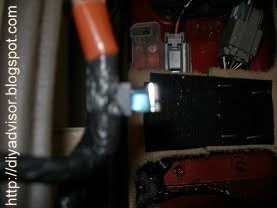
Step 7: Fig.7 shows the black electrical tape that will need to be removed to get to the electrical junction. Sometimes the wires at the back of the switch can be pulled off and replaced on the new switch. But in this case the wires were part of the switch.
Fig.7 Wire junction
Step 8: Fig.8 shows that the black electrical tape was removed revealing the junction between the brake switch and the orange power line. Pull the lines apart and release it from the orange cable. Use a razor knife to remove the black electrical tape and to reapply the tape back on the new switch wiring. Electrical stripper were used to remove the existing wiring and to place the new switch wiring.

Note: Remember how electrical junction was removed because the new switch will need to be put back on.
Fig.8 Tape removed
Step 9: Fig.9 shows the removal and replacement of the brake switch using a Star Screwdriver. Remove or replace take two screws from the new brake light switch
Fig.9 New brake light switch
Step 10: Fig.10 shows both switches are ready to be placed into the console.
Fig.10 New switch 
and cable installed
Step 11: Fig.11 and fig.12 shows the cover being placed back into the center console. Install in reverse order of the removal.
Fig.11 Tap both sides 
of console lid
Fig.12 Pushing lid in place

Lincoln LS E-books:

Update: DIY Advisor has New blogs check them today:
  • Cookie Alert: European Union laws requires that you know that this blog uses cookies. If you are concerned about this please click here to see how Google uses this information.


Note: The DIY Advisor assumes no liability for omissions, errors or the outcome of any jobs. The reader must always exercise reasonable caution, follow current codes and regulations that may apply, and is urged to consult with a licensed contractor if in doubt about any steps on these posts. All names were changed to protect client's privacy. DIY Advisor. Reproduction of site content including photos without permission prohibited. All rights reserved. © Copyright 2011